SpecWeave CLI 3.1.0Free and open source
The work outlives the session.
Your agent writes the code. SpecWeave keeps what done means, what proved it and where you stopped, as plain files in git, so Claude Code, Codex or any other agent can continue the same task.
npm i -g specweaveVersion 3.1.0, released 17 October 2026. Free and open source.
$ specweave pickup Picked up the handoff from claude@cloud (out of tokens): applied 7 uncommitted files. SpecWeave pickup · you are codex@laptop Increment 0001-resumable-checkout "Resumable checkout" (active) · tasks 1/2 done Next: T-02 Restore the draft on return AC-01: Returning within 24 hours restores the cart and shipping choice AC-02: A paid order is never restored Files: src/restore.js | Test: npm test Branch: main · in sync with origin/main · 3 uncommitted files Last handoff: claude@cloud: out of tokens · next: finish restore on return Notes: - claude@cloud: Payment thread: drafts must never store card data
Six commands from plan to closed
Every step leaves a file behind. Nothing closes on a checkbox: the test runs, its output is stored, and the increment stays open until verification passes.
01 Plan the increment
$ specweave create-increment "Resumable checkout"The agent fills in Problem, Scope, numbered acceptance criteria, Approach and Tasks. Before it writes, sw-increment asks only the decisions that need you, one at a time with a recommended answer: at most five by default, and
planning.deepInterviewsets the depth.spec.mdEach task names its criteria, its files and its test.02 Claim a task
$ specweave task claim T-02The claim goes into the ledger, so a second agent asking for the same task is refused. A claim older than two hours is stale and can be taken over.
specweave task nextprints the next task with the text of its criteria.ledger.jsonlAppend-only: claim, done, release, skip and block events.03 Prove it is done
$ specweave task done T-02 --run "npm test"The CLI runs the test itself. Only exit 0 records the task as done, with the commit and the tail of the output as evidence. A failing run records nothing.
reports/task-T-02.txtThe full command output, with its exit code and time.04 Verify the increment
$ specweave verifyRuns your test, lint and build commands, from
testing.commandsor detected frompackage.json, Cargo, pytest or Go, and checks every acceptance criterion.reports/verify.jsonok is true only when every command and criterion passes.05 Review with the other model
$ specweave reviewHands the diff to a reviewer from a different model family than the one that wrote it: Codex reviews Claude's code, Claude reviews OpenAI's. Exit 0 means ship, exit 3 means fix first.
--briefprints the brief to paste into any tool. New in 3.1.0; see Review with another model.reports/review-codex.mdThe findings and the verdict, named after the reviewer.06 Close it
$ specweave complete 0001Refuses while
reports/verify.jsonis missing or not ok. Closing without it takes--reason, and the reason is stored with the increment.metadata.jsonCompleted, or the reason it closed without proof.
Commands, flags and file names as in specweave 3.1.0. The increment, task and reviewer are the example used throughout this page.
Out of tokens is not the end
Say "hand off" in the tool you are leaving and "pick up where I left off" in the next one. Codex can continue what Claude Code started, on the same machine or another one. Nothing is copied between tools: specweave handoff pushes a snapshot to specweave-handoff and wip/<branch> and adds a ledger event.
handoff --allWrites one index of every active increment and every nested repository with local-only work.pickup --listShows the pending handoffs, newest first, and changes nothing.pickup <id or title>Takes a specific one when several are waiting.handoff --no-pushKeeps the handoff on this machine instead of pushing it to your remote.
Leaving: Claude Code, as claude@cloud
$ specweave handoff --reason "out of tokens"
Handed off 0001-resumable-checkout (released T-02, pushed your uncommitted edits).
To continue in any tool, machine or account, say "pick up" there (or run `specweave pickup`).
Details: .specweave/increments/0001-resumable-checkout/handoff.mdA snapshot pushed to specweave-handoff and wip/<branch> on your remote, plus a handoff event in the ledger
Arriving: Codex, as codex@laptop
$ specweave pickup
Picked up the handoff from claude@cloud (out of tokens): applied 7 uncommitted files.
SpecWeave pickup · you are codex@laptop
Increment 0001-resumable-checkout "Resumable checkout" (active) · tasks 1/2 done
Next: T-02 Restore the draft on return
The pickup lines are real output from a second clone running as Codex. The handoff lines are the CLI's exact message for the same run.
Usage limits, handled before they hit
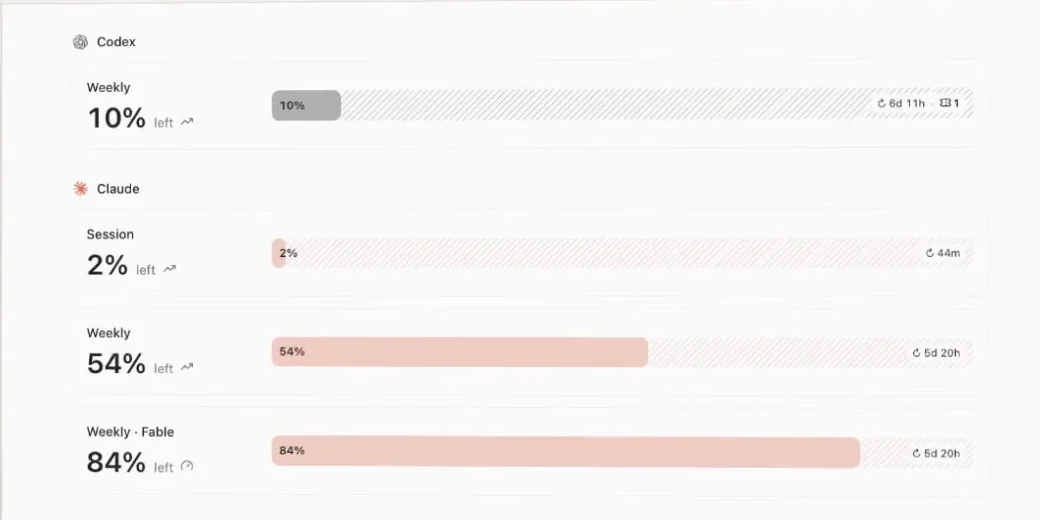
specweave auto-handoff on adds hooks to Claude Code, Codex and Grok Build. Every hook saves a local checkpoint, and at 95% of any usage window the mode decides what happens (Grok reports no percentage, so its hook acts when a turn hits its rate limit).
suggestDefault- At the threshold
- Tells you once that a handoff is ready and keeps working.
- Use it for
- The default. You decide when to switch.
enforce- At the threshold
- Runs specweave handoff and stops the session.
- Use it for
- Unattended runs that should stop cleanly at a task boundary.
checkpoint- At the threshold
- Only saves local checkpoints and never hands off.
- Use it for
- Plans where credits or a proxy keep working past the limit.
--at 90Moves the threshold; the default is 95.--wait-under 30Does nothing when every full window resets within that many minutes; the default is 30.autocompact onCompacts Claude Code at 400K tokens instead of near a million, so late turns stay small.
Running agents in SpecWithCode? Use one machine per provider subscription: keep each machine signed in to one account per provider for good, and add a machine when you need more capacity instead of switching subscriptions by hand.
Seven skills by default, four when you need them
Skills are short instructions your agent loads on demand. Since 3.1.0, the optional ones turn on when your project calls for them. specweave skills list shows why each is on, and enable or disable changes it.
In every project
sw-increment- Plans the increment as one spec.md and asks the critical decisions first.
sw-grill-me- Interviews you in rounds until every decision in a plan is settled. With planning.deepInterview set to deep, every new increment runs it.
sw-do- Works the increment task by task: claim, implement inside its files, test, commit, done with evidence. Alone, unattended or in parallel lanes.
sw-auto- Runs an increment unattended until every task is done, then verifies and closes it.
sw-review- An adversarial review by a fresh context or another model family. Every finding cites a file and line.
sw-done- Closes the increment: tasks done, verify green, a fresh-context review, then complete.
sw-handoff- Hands the work to another tool, account or machine, and picks it up there.
When the project calls for them
sw-glossary- Builds
GLOSSARY.md, the project's shared words.specweave glossary check --strictfails CI on drift. sw-sync- Pushes increments to GitHub, Jira or Azure DevOps. On when the project has a tracker.
sw-project- Reads and updates the project hub. On when
.specweave/project/hub.jsonexists. sw-jev- Hands closed-set decisions to Jev. On when
jev.enabledis set.
A record you can inspect
Everything above is ordinary files in your repository. Git review and access controls protect the history; these files are not a tamper-proof audit system.
spec.mdWhat done means
Written at planning and read before code.
ledger.jsonlWhat happened
Claims, completions with evidence, notes and handoffs.
reports/What proved it
Task logs,
verify.md,verify.jsonand review reports.handoff.mdWhere you stopped
Written by
specweave handoff.specweave noteNotes for the next agent
Stored in the ledger, and
pickupshows them..specweave/memory/Decisions that outlive the session
One file per fact, indexed in
MEMORY.mdand committed, so every tool and account sees it.specweave dashboardA board of all of it
Local only, on 127.0.0.1 port 3456 by default. Reading it needs no model call.
specweave reportWho did what, as a page
An HTML timeline of tools, sessions, handoffs and evidence in
reports/handoff-report.html.
What the dashboard reads for the example
| Increment | 0001-resumable-checkout Resumable checkout |
|---|---|
| State | Active |
| Tasks | 1 of 2 done |
| Next task | T-02 Restore the draft on return |
| Criteria | AC-01 Returning within 24 hours restores the cart and shipping choice. AC-02 A paid order is never restored. |
| Files and test | src/restore.js, npm test |
| Last handoff | claude@cloud, out of tokens. Picked up by codex@laptop. |
Built from the same specweave pickup run shown at the top of this page. Run specweave dashboard in your project to see yours.
Connected to the tools you already use
Each one is optional and stays off until you set it up.
Code navigation
$ specweave lsp refs src/restore.js restoreDraftReferences, definitions, hover types and symbols from language servers, so agents stop grepping.
LSP guidespecweave lsp setuppicks servers for the languages in your repository.Jev
$ specweave jev route "<prompt>"Closed-set decisions in about 250 ms: which skill or model tier, whether a shell command is safe to run, whether pulled text needs a second look. Opt in with
About Jevspecweave jev setup.Project hub
$ specweave project briefA shared goal, context, artifacts and routines in
Portable projects guide.specweave/project/hub.jsonthat every tool reads.--harness codexexports the brief for another tool.Existing repositories
$ specweave get owner/repoClones and registers a repository in the workspace, or every repository in an organization with
Workspace adoption guide--all.--dry-runpreviews adopting a checkout you already have.Issue trackers
$ specweave sync pushOptional. Push an increment to GitHub Issues, Jira or Azure DevOps when your team plans there.
Tracker sync guide
Run the same increments in a desktop app
A SpecWithCode worker thread works on one branch and opens one pull request, which is exactly an increment's shape. Its checklist is the increment's task list, and its ledger writes are the commands on this page. Threads leave each other notes in the ledger instead of editing each other's files.
See SpecWithCode