Switch AI tools without losing your place.
SpecWeave writes the plan and every finished task into git, so Claude Code, Codex or any other agent can pick up the same work. SpecWithCode (pronounced “Spec with Code”) runs those agents on your own machines and subscriptions.
Both free. The app runs on Apple silicon Macs with macOS 13 or later, Windows 10 and 11, and Linux: download SpecWithCode.
npm install -g specweave
Works withClaude CodeCodexCursorGemini CLIGitHub Copilot CLIGrokOpenCodeMuse CodeAntigravityPi
One record in git, three ways to work with it
SpecWeave keeps the plan and the evidence in your repository. SpecWithCode runs agents against that record on your machines. Verified Skill gives those agents skills you can check first.
SpecWeave CLI
Open source on npm, MIT. Version 3.1.0, 17 October 2026.
Writes the spec, the task ledger and the test evidence into your repository, and hands the work to the next tool with
specweave handoff. Start here if you work in a terminal with Claude Code, Codex or any agent that reads files.How the CLI worksThen run specweave init in your project.npm install -g specweaveSpecWithCode
Free app for Mac, Windows and Linux. Version 1.0.94.
A coordinator per project starts worker threads in the agents you already pay for, on your own machines. Each thread shows its SpecWeave increment and task progress, and its reports are saved beside the increment. Start here if you want one window for several agents.
Verified Skill
Free to browse at verified-skill.com.
A registry of agent skills. Each shows its source and its security scan, and its evaluation when one exists, so you know what you install before your agents use it.
Explore skills
When Claude Code hits its limit, Codex picks up the same task
The handoff carries the spec, the claims and the evidence. Nothing lives only in a chat window.
The spec
What done means, written once before any agent starts.
spec.md## Acceptance Criteria - [ ] AC-01: Returning within 24 hours restores the cart and shipping choice - [ ] AC-02: A paid order is never restored ### T-01 Save the cart as a draft - AC: AC-01 | Files: src/draft.js | Test: npm test ### T-02 Restore the draft on return - AC: AC-01, AC-02 | Files: src/restore.js | Test: npm test
The agents
Any tool that can read the files claims a task, proves it and moves on.
specweave task claim T-01Claude Code takes the first open task. The claim is a line in the ledger, so no other agent takes it too.
specweave task done T-01 --run "npm test"Runs the task’s test. Exit 0 is the evidence, and the full output is saved in
reports/task-T-01.txt.specweave task claim T-02Claude Code claims T-02 and hits its usage limit halfway through.
Usage limit
The ledger in git
Every claim, finish and release is one line, committed with the code.
ledger.jsonl{"t":"T-01","e":"claim","by":"claude@cloud","at":"2026-10-15T14:02:11Z"} {"t":"T-01","e":"done","by":"claude@cloud","at":"2026-10-15T14:31:40Z","evidence":"a41c9e2"} {"t":"T-02","e":"claim","by":"claude@cloud","at":"2026-10-15T14:32:05Z"} {"t":"T-02","e":"release","by":"claude@cloud","at":"2026-10-15T14:58:47Z","note":"handoff"} {"t":"*","e":"handoff","by":"claude@cloud","at":"2026-10-15T14:58:47Z","note":"usage limit"} {"t":"T-02","e":"claim","by":"codex@laptop","at":"2026-10-15T15:04:19Z"} {"t":"T-02","e":"done","by":"codex@laptop","at":"2026-10-15T15:22:51Z","evidence":"npm test → exit 0\nlog: .specweave/increments/0001-resumable-checkout/reports/task-T-02.txt\nHEAD 7d03b1f"}The handoff
Another tool continues from the same files, not from a chat window.
claude@cloud hands T-02 to codex@laptop
specweave handoffReleases the claim, writes
handoff.mdwith what is next and pushes a snapshot tospecweave-handoffandwip/<branch>.specweave pickupIn Codex: fetches the handoff, applies the edits and prints T-02 with its two criteria.
specweave task done T-02 --run "npm test"Codex finishes T-02 against the same criteria, and the ledger cites the test output.
specweave verifyRuns test, lint and build, checks every criterion and writes
Passreports/verify.json.
Example increment, written in the formats specweave 3.1.0 reads: criteria as - [ ] AC-01: lines, one JSON object per ledger line. See a real pickup in How SpecWeave works.
Nothing closes without proof
Open the increment folder and you can see what was planned, who did it and what proved it.
.specweave/ increments/0001-resumable-checkout/ spec.mdthe plan and its acceptance criteria ledger.jsonlwho claimed and finished each task handoff.mdwhere the last agent stopped reports/ task-T-02.txttest output the ledger cites verify.mdtests, lint, build and criteria verify.jsonthe closure gate review-codex.mda review by the other model memory/MEMORY.mdfacts every tool reads at pickup
specweave verifyPassRuns your test, lint and build commands, checks that every criterion inspec.mdis ticked and writesreports/verify.json.specweave reviewExit 3, fix firstHands the diff to a reviewer from the other model family: Codex reviews code Claude wrote, Claude reviews code Codex wrote. The report lands inreports/review-codex.md; exit 0 means ship.specweave completeBlockedRefuses to close an increment without a passingverify.json. Closing anyway takes--reason, and the reason is stored with the increment.
Behaviour of specweave 3.1.0, released 17 October 2026.
Run the same work from a desktop app
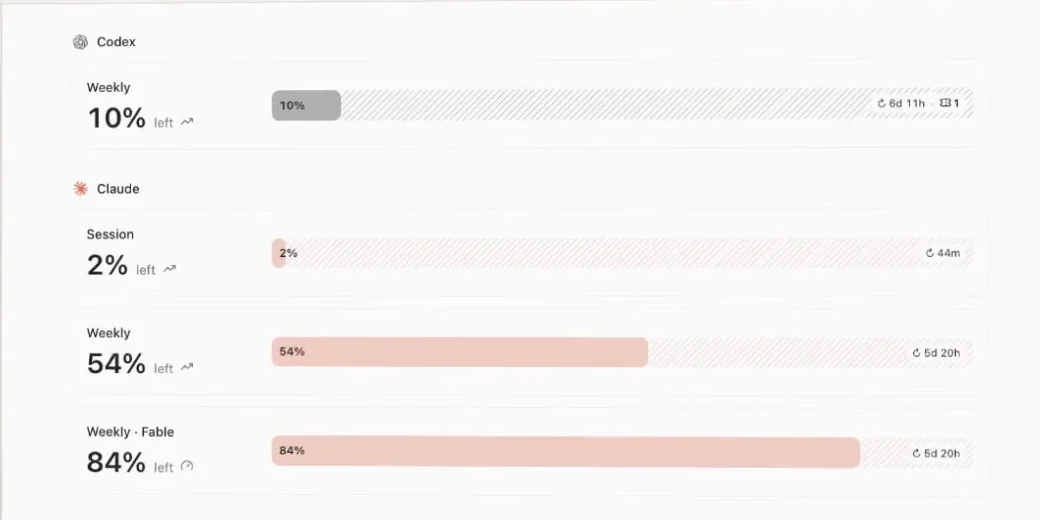
SpecWithCode runs these increments as threads on your own machines and subscriptions, with one coordinator per project and workers on any provider you are signed in to.
Your machines, not a cloud container
- Runs where your code, skills and logins already are.
- Workers keep going while your laptop sleeps, on the machine running them.
- Each agent uses its provider’s own sign-in and approvals. There is no account with us.
- Add a Mac mini or a Linux machine by its Tailscale name: choose Invite this machine in its Settings or run
specwithcode fleet invitethere, then paste the line into Add a machine under Settings, Connections on your main Mac.
One machine per subscription. Sign each machine in to one account per provider and leave it there, for example Claude Code on one account and Codex on another. Switching subscriptions by hand on the same machine causes confusion; when you need more capacity, add a machine.
Add skills that passed a scan
Verified Skill shows where a skill comes from and what its security scan found before you install it into your agents.
Explore skills on verified-skill.comWhat every skill page shows
- SourceThe repository the skill comes from, so you can read it first.
- Security scanWhat the scan of every file found, before you install it.
- Evaluation, when one existsWhether the skill helped on a real task. Not every skill has one yet.
Learn it in a few minutes
Narrated recordings of the real apps, with captions and chapters.
- See how SpecWithCode runs your agentsSpecWithCode, 2 min 55 s, published 12 October 2026
- Run your first task with CodexSpecWithCode, 1 min 13 s, published 11 October 2026
- Continue a thread on Codex at a usage limitSpecWithCode, 1 min 1 s, published 10 October 2026
Built for teams of 2–10 people, free to run
Teams pay only if they want hosted skills, setup help or support.
See pricing- SpecWithCode app
- Free
- SpecWeave CLI
- Free, MIT licensed
- Seat fee / usage cap
- None
- Markup on your AI subscriptions
- None
Built with SpecWeave
- EasyChampLeague and club tools, built across Claude Code threads, two subscriptions and Codex.
- JobWeaveJob search, tailored resumes and interview preparation.
- Verified SkillSkill discovery, source inspection and local evaluations.